Esper positions itself as an MDM for dedicated devices – kiosks, POS terminals, digital signage, and rugged handhelds. When a team needs to manage a fleet of dedicated hardware, that focus makes more sense than a general-purpose MDM built for employee phones and laptops. Esper is therefore a reasonable starting point for evaluating dedicated-device MDM platforms.
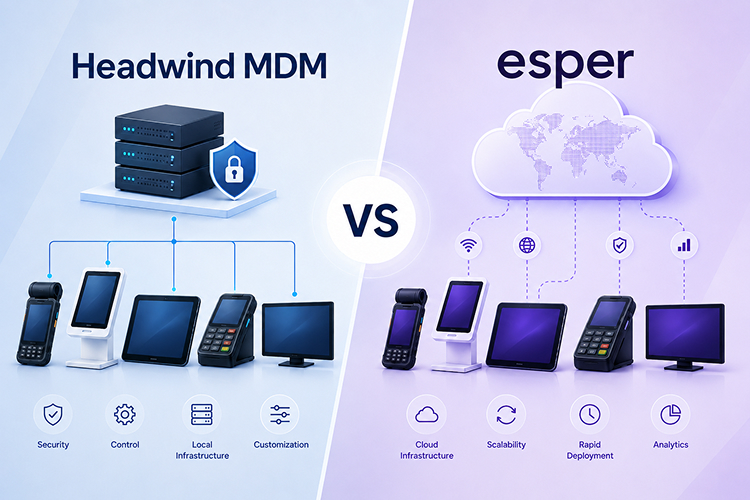
Esper is a multi-platform MDM that supports Android, iOS, Linux, and Windows, while Headwind MDM focuses on Android. If your fleet includes multiple operating systems, the comparison isn’t entirely one-to-one. Because most dedicated devices run Android or AOSP, this article focuses on those platforms and three key aspects of managing them at scale.
This comparison focuses on three areas that matter most: MDM agent deployment, remote updates, and cloud independence.
Headwind MDM vs Esper: Feature Comparison
Esper is strong at zero-touch-style provisioning, staged rollouts, OTA update management through Esper Airwave, and multi-platform support.
Esper’s limits: it’s cloud-only, with no on-premise or air-gapped option, and there’s no free tier – only a 30-day trial, with a 25-device minimum on any paid contract.
Headwind MDM’s strengths: an open-source core, on-premise and closed-network operation, and straightforward AOSP integration with several installation paths.
| Area | Headwind MDM | Esper |
|---|---|---|
| Type | Open-Core | Proprietary platform, cloud-native |
| Platforms | Android | Android, iOS / iPadOS, Linux, Windows |
| Hosting | Self-hosted or Cloud | Cloud-native (SaaS) |
| Runs fully offline (air-gapped) | Yes | No |
| Free tier | Yes – Community, self-hosted, unlimited devices | No |
| Paid pricing | Pay-once Premium or cloud subscription | $2–$6 per device/month, enterprise on quote |
| Dev tooling (CI/CD, config-as-code, SDK) | Basic | Yes (SDK, API, CI/CD) |
| AOSP Deployment | Yes (Provision app in AOSP, platform-signed agent, ADB) | Yes (ADB, Seamless Provisioning) |
| Sweet spot | Open, offline, owned, predictable-cost Android fleets | Engineering-led teams shipping software to devices |
Installing the MDM agent on a dedicated or AOSP device
Device provisioning – the step that installs and activates the MDM agent – is normally handled by the Android setup wizard. That wizard is a proprietary Google component, not part of AOSP. So dedicated devices built on AOSP, without Google Mobile Services, often have no built-in way to enroll into an MDM at all. The vendor has to supply one.
How Esper installs the MDM agent
Seamless Provisioning is an agent integrated into the device firmware. On first boot, that agent contacts the Esper cloud, looks up the device by its IMEI or serial number, and applies the matching device profile – Esper calls these “Blueprints.” The serial or IMEI has to be registered in the web console beforehand. If it isn’t, the device starts up unmanaged.
The catch is that the integration itself isn’t publicly documented, and it appears to be a heavier lift than simply preinstalling an APK – it may require access to the ROM source. And because enrollment hinges on a cloud lookup against a registered identifier, the firmware ships with an Esper agent baked in whether or not the device is ever activated. For organizations that need full visibility into firmware and network communication, this is an important consideration before choosing a platform.
Device Provisioner is Esper’s second path: a desktop application that installs the agent over ADB. It’s a reasonable manual option for smaller batches, but it still routes everything through the Esper cloud.
Headwind MDM’s installation paths
Headwind MDM gives you three installation paths, and the difference from Esper is that you can see and control all three.
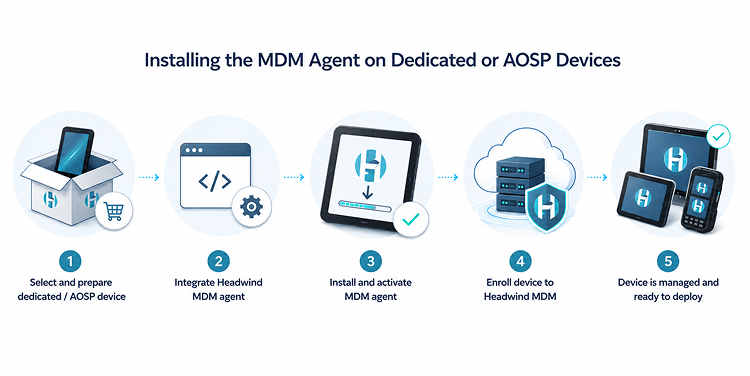
The open-source route uses the “Provision” application that ships with AOSP. The OEM sets the Headwind MDM parameters – server address, agent APK – in that application’s source code, includes it in the ROM, and rebuilds the ROM. This installs a stock Headwind agent, so devices stay in sync with upstream source. Nothing here is hidden: it’s AOSP source you compile yourself.
The platform-signed agent route avoids rebuilding the ROM. You install a platform-signed Headwind agent that provisions the device on first start. To manage the signing keys and custom agents this approach needs, Headwind offers a cloud build service, so you don’t have to run the signing infrastructure yourself.
The ADB route. You configure a device to talk to any Headwind MDM server and enroll it by IMEI or serial number. It’s the fastest path for testing and for one-off hardware.
After a Headwind agent is installed, the device is managed. If it isn’t registered in the web console, it either registers automatically or throws an error and stays unusable until you add it to the console explicitly.
For AOSP provisioning, Headwind is the stronger choice for teams that want an open, inspectable, self-controlled provisioning process. Esper’s Seamless Provisioning works well once it’s set up, but it’s a closed, cloud-dependent path you can’t fully audit.
Headwind MDM vs Esper Pricing Comparison
Esper’s paid tiers cost roughly $2 per device per month for Genesis and $4 for Bridge, while the larger Architect tier is $6, and Enterprise is priced individually. For a fleet of 200 devices on Architect, that comes to:
$6 × 200 × 12 = $14,400 per year – and you pay that sum again every year.
Headwind MDM’s Community Edition stays free if you self-host it, with no limit on the number of devices. The Premium license is a one-time purchase tiered by fleet size, with optional yearly support renewal. For a comparable 200-device fleet, total license costs work out roughly five times lower than Esper Architect over the first year – and the gap widens further as you renew.
At small scale, Esper’s 30-day trial gives you a way to evaluate. But once you commit to a paid plan – and the 25-device minimum kicks in – the difference becomes significant, and it lands in Headwind MDM’s favor. The cost advantage becomes even more significant as fleet size grows beyond 200 devices or the moment you move to self-hosted.
One catch with the free option: when you self-host, the server becomes your responsibility – updates, backups, system uptime. In Esper’s cloud model, the provider handles all of that. If you don’t have someone to take care of this, that convenience is worth real money, so before calling the Community Edition “free,” factor in staff time.
Remote updates to devices in the field
When dedicated devices are deployed and running, you need a reliable way to update them – and ideally a way to test an update on a few units before it reaches the whole fleet.
Esper built its “DevOps for devices” model around exactly this problem. Staged rollouts come out of the box: you push an update to a test group, watch how it behaves, then promote it to production. Esper Airwave handles firmware and OTA updates, including staged delivery. If your deployment process depends on staged, testable rollouts, that’s a real advantage.
Headwind MDM has no built-in staged-rollout concept. To test an update before production, an admin has to define a test group and a production group manually, install on the test group first, and then promote it by hand. There’s no direct rollback workflow. Headwind also doesn’t support OTA firmware updates – those are manufacturer-specific and require vendor SDKs.
Staging and orchestrating remote software updates are a particular strength of Esper. Organizations that rely on staged, automated, and carefully validated rollouts may find its capabilities particularly well suited to those requirements.
Cloud vs On-Premise Deployment
The last question is whether the platform can run on hardware that isn’t allowed to reach an outside cloud – devices on isolated networks, in air-gapped facilities, or behind closed VPNs.
Esper is cloud-only. Device management and the software components that go with it all pass through the Esper cloud. That’s a deliberate architectural choice, and for connected fleets it’s perfectly reasonable. But it draws a hard line: if your devices can’t reach the internet, Esper can’t reach your devices.
Headwind MDM is built primarily to run on-premise, and it fits air-gapped networks well. The on-premise installation is properly documented, and the command-delivery mechanism doesn’t depend on Firebase or FCM, so it keeps working inside a fully closed perimeter.
Dedicated-device fleets are often exactly the kind that sit on isolated networks – payment terminals under strict compliance rules, industrial hardware on a closed plant network, government devices with no internet access. For autonomous operation, Headwind wins, because Esper simply isn’t an option for those environments.
Which platform fits your fleet?
Esper fits if your fleet is connected, you want staged rollouts and OTA firmware management without building that infrastructure yourself, or you manage devices across more than one operating system.
Headwind MDM fits if your devices run Android or AOSP, you need an open, inspectable deployment process you control end to end, you run on-premise or in air-gapped networks, or open source is a requirement rather than a nice-to-have. If your hardware runs Android and these priorities line up with yours, try the free Community Edition or start a Cloud trial and put it on your own devices.
FAQ
Is Headwind an open-source alternative to Esper for dedicated devices?
Yes, for Android and AOSP hardware. Esper is a closed, cloud-only platform with open SDKs and APIs around it. Headwind’s MDM core is open source, runs on your own infrastructure, and supports AOSP integration directly.
Can Esper run on-premise or in an air-gapped network?
No. Esper is cloud-only, and device management passes through the Esper cloud. Headwind MDM is designed to run on-premise and works in air-gapped and closed networks.
Does Esper have a free tier?
No. Esper offers a 30-day trial, with a 25-device minimum on paid contracts. Headwind’s Community Edition is free for an unlimited number of devices when self-hosted.