Headwind MDM 7 is now available as a stable release. Version 7.03.1 rebuilds the web console on OpenJDK 21, Tomcat 10+, and Angular. Plugins now ship as standalone WAR files. Self-hosted installations of all three editions can upgrade now.
In August we released the v7 beta for testing on separate instances. The stable build is now ready for production servers. This post covers what changed and how to upgrade.
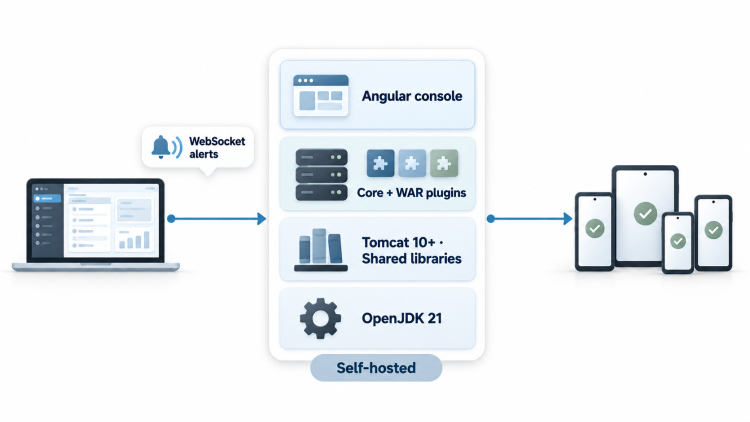
Headwind MDM 7 Technology Stack: OpenJDK 21, Tomcat 10+, and Angular
Version 7 moves the server to actively maintained platforms. The backend runs on Java (OpenJDK 21) and requires Tomcat 10 or later. Tomcat 9 is no longer supported.
The web console was rebuilt in Angular. We redesigned navigation, device lists, and configuration screens around current admin console practices.
For self-hosted installations, the stack matters for security. Older Java and Tomcat branches reach end of life and stop receiving upstream fixes. Version 7 keeps your server on branches that are still patched.
Standalone WAR Plugins in Headwind MDM 7
Plugins can now be developed and packaged as standalone WAR files. Before version 7, each custom plugin required a rebuild of the entire project. Now a plugin deploys on its own.
Plugin updates also no longer depend on the core release cycle. You can ship a fix to your plugin without waiting for the next Headwind MDM version.
Developers can build plugins on the free Community Edition and distribute them to Enterprise customers. Integrators and resellers can package their own extensions for their clients.
Real-Time Alerts in the Headwind MDM Web Console
The web console now receives backend alerts over WebSockets. Alerts appear instantly as pop-up notifications. An administrator sees an event as soon as the server registers it.
Smaller Headwind MDM Updates With Shared Tomcat Libraries
Most libraries used by Headwind MDM now deploy to the Tomcat lib directory. The web application package itself becomes much smaller. Future updates download and deploy faster.
How to Upgrade to Headwind MDM 7
Take a snapshot of the whole server before you upgrade. There is no rollback option.
The recommended platform for version 7 is Ubuntu 24.04 LTS.
Upgrading Headwind MDM Community Edition to Version 7
Download the new installer from the download page. To migrate a legacy 5.x installation, run the migrate.sh script included in the installer.
Upgrading Headwind MDM Premium and Enterprise to Version 7
Email info@h-mdm.com with the subject “Upgrade v7”. We will send you the version 7 installer for your edition.
New Premium trials now run on version 7.
Headwind MDM Cloud and Docker Availability
Cloud instances and the Docker image still run the previous version. We will move them to version 7 later and announce it on the blog.
If you run into problems during migration, ask on the Headwind MDM Q&A forum.
Headwind MDM 7 Source Code and Downloads
The server source code is on GitHub at h-mdm/hmdm-server-v7. Installers and the WAR file are on the download page.
To compare editions, see the version comparison and pricing.