Clinical Eye is an Italian telemedicine company that brings hospital-level nursing support into patients’ homes. Its DOT device lets a nurse at the hospital guide a trained caregiver through a medical procedure in real time. An Android smartphone sits at the core of every DOT unit. Clinical Eye uses Headwind MDM to keep 180 of these devices locked to a single purpose and up to date across Italy.
What Clinical Eye Does in Home Teleassistance
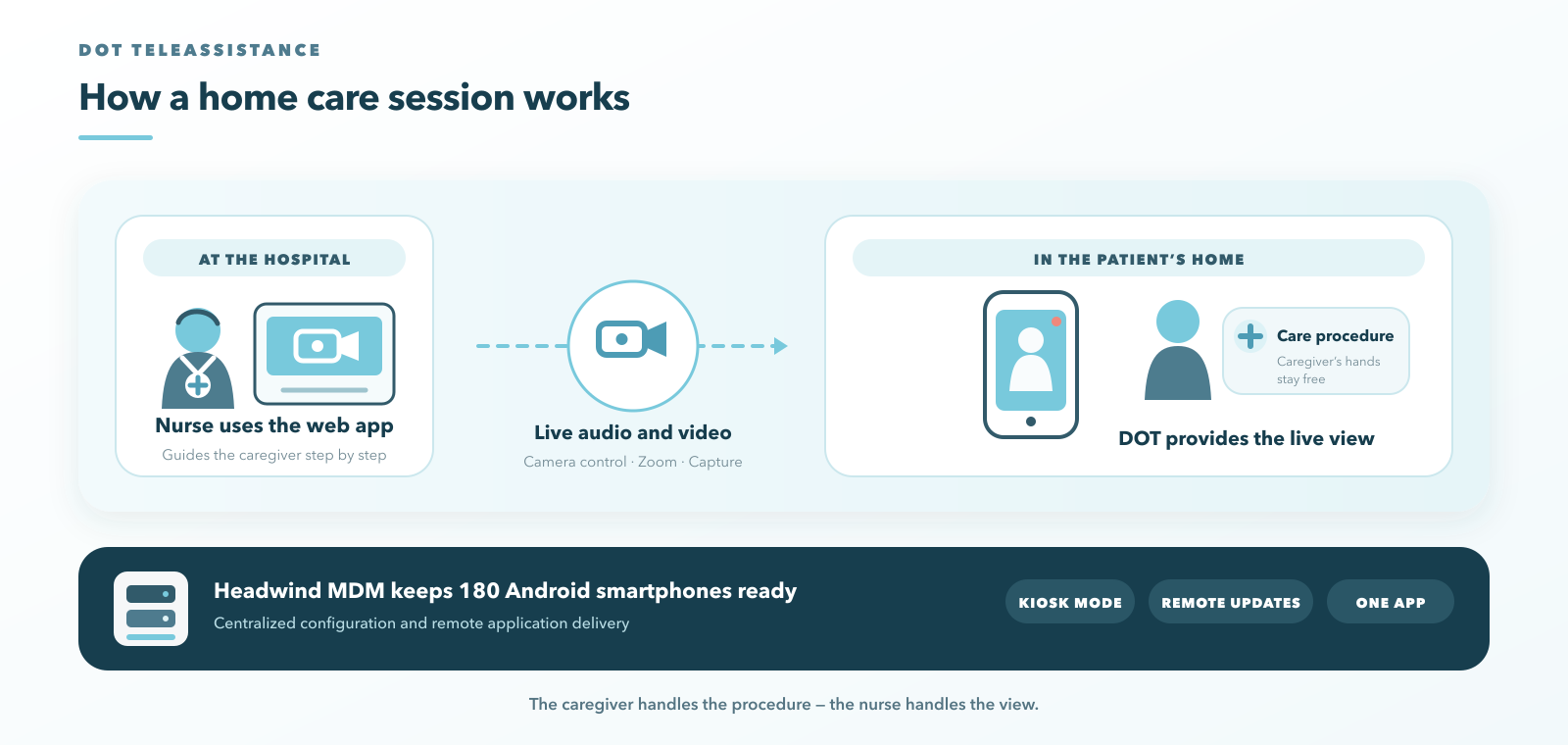
Clinical Eye provides a teleassistance system for patients who need regular nursing care at home. The hospital trains a caregiver, usually a family member or a home assistant. During each session, a healthcare professional at the hospital connects to the patient’s home and guides the caregiver step by step.
Typical procedures include:
- PICC line dressing changes
- Care for hard-to-heal wounds
- Assisted medical exercise
- Post-stroke rehabilitation and occupational therapy
Most patients are in oncology care. Clinical Eye also serves rheumatology patients who need assisted physical activity and dermatology patients with complex wounds.
How the DOT Teleassistance Device Works
DOT stands for Device for Omnidirectional Teleassistance. Each unit combines a small robotic arm with an Android smartphone. The patient receives the device at home.
The smartphone handles two-way audio and video. The healthcare professional controls the robotic arm through Clinical Eye’s web application and frames the scene remotely. The operator can zoom in on a wound and capture photos and video during the session. These records feed directly into the patient’s nursing chart.
The caregiver does not need to handle the camera. The nurse at the hospital sees exactly what the procedure requires.
Why Clinical Eye Built Its Medical Device on Android
Clinical Eye chose Android smartphones for two practical reasons.
The first is hardware cost. Android devices are available at prices that make a home-based medical service sustainable.
The second is familiarity. Many patients have limited digital skills. A smartphone is an everyday object for them, so the device does not feel foreign in the home. This lowers the barrier to accepting remote care.
Android also gave the team a platform to develop the system step by step as the service grew.
Why a Medical Device Built on a Smartphone Needs MDM
A smartphone out of the box is a general-purpose device. A DOT unit has one job. Every device sits in a different patient’s home, and the Clinical Eye team cannot visit each one to fix a setting or install an update.
Clinical Eye needed a way to:
- Deploy and update its proprietary app on every device in the field
- Lock each smartphone to a single-purpose use
- Keep devices available and responsive for remote operators
- Manage devices spread across many homes and locations
Clinical Eye rated each of these needs as a full match for what an MDM platform provides.
Why Clinical Eye Chose Headwind MDM for Its Telemedicine Devices
Two factors weighed most in the decision.
Kiosk mode. Headwind MDM locks the smartphone to Clinical Eye’s application. The patient sees only the teleassistance interface. There are no other apps to open and no settings to explore. Learn how kiosk mode works in Headwind MDM.
Predictable cost at scale. A telemedicine service ships hardware to every new patient. The cost of managing each additional device has to stay predictable as the fleet grows.
Clinical Eye also valued several other factors:
- The option to run the MDM server on its own infrastructure, which keeps control of the management layer in-house
- Deep customization to fit the MDM into its own platform
- The quality and responsiveness of Headwind’s support team
“Our patients are often not comfortable with technology, and a smartphone is something familiar to them. Headwind MDM lets us keep 180 DOT devices in patients’ homes locked to our application and updated remotely.”
Dr. Carlo Ristori, Amministratore unico, Clinical Eye Srl
How Clinical Eye Uses Headwind MDM Day to Day
Remote App Updates on Devices in Patients’ Homes
Clinical Eye releases new versions of its application through Headwind MDM. Updates reach every DOT unit remotely. No technician visits the patient, and the caregiver does not need to do anything.
Kiosk Mode for a Single-Purpose Medical Device
Each smartphone runs in kiosk mode and shows only the Clinical Eye application. This keeps the interface simple for patients and caregivers. It also keeps the device ready for the next session with the hospital.
Device Provisioning Before Shipment to Patients
The team prepares each DOT unit before it leaves for a patient’s home. Headwind MDM enrolls the smartphone and applies its configuration in advance. The device arrives ready to use.
What Medical Device Makers Can Learn from Clinical Eye’s Setup
Clinical Eye’s experience points to a few takeaways for companies that build medical or telemedicine devices on Android.
Plan device management from the start. Once devices sit in patients’ homes, every manual fix becomes a home visit. Remote updates and centralized configuration should be part of the product design.
Treat the smartphone as a component. Patients should see a medical tool with one function. Kiosk mode turns a consumer phone into a dedicated device.
Check how licensing scales with your fleet. Every new patient means a new device. Cost per device matters as much as the feature list.
See how Headwind MDM deployment works, or compare the open source and Enterprise versions.