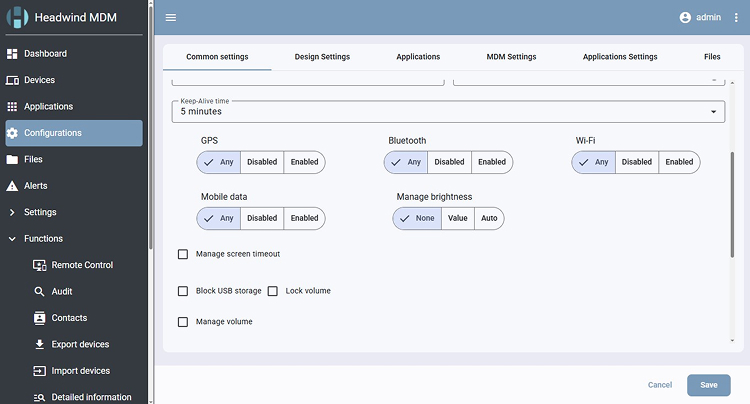
A major update to the Headwind MDM web console is ready for beta testing. We rebuilt the console on a modern technology stack and reworked how plugins are built and delivered.
What changed in the technology stack
We migrated Headwind MDM to actively maintained platforms and libraries:
- Java (OpenJDK 21)
- Tomcat 10+
- Angular
The web interface was redesigned and rebuilt following modern admin console and dashboard practices. Navigation, device lists, and configuration screens all changed.
Plugins now ship as standalone WAR files
In previous versions, a custom plugin required rebuilding the entire project. In v7, plugins are developed and packaged as standalone WAR files. Developers can build plugins on the Community Edition and distribute them to Enterprise customers.
This removes the main obstacle for teams that maintain their own extensions. Plugin updates no longer depend on the release cycle of the core product.
Alerts arrive over WebSockets
The web console now receives backend alerts over WebSockets and displays them as pop-up notifications. Administrators see events as they happen instead of waiting for a page refresh.
Shared libraries reduce update size
Most libraries used by Headwind MDM now deploy to the Tomcat lib directory. Web application updates became smaller, which matters for self-hosted setups on limited bandwidth and for air-gapped networks where updates are transferred manually.
Deployment and migration
The recommended platform for Headwind MDM v7 is Ubuntu 24.04 LTS. Existing users on Ubuntu 22.04 can move to v7 by running the migration script.
Community, Premium, and Enterprise editions are all available for the beta.
Take a snapshot of your instance before you update. The migration cannot be rolled back. Run the beta on a test instance first and keep your production server on the current stable version.
How to get the beta
Email us at info@h-mdm.com and we will send you the v7 installer along with installation instructions.
This is a beta release. The build may contain bugs, and there’s no rollback option. We recommend testing it on a separate instance, and using it in production with care and only after taking a backup.