Android barcode scanners are supposed to do one thing well: scan products. But underneath, they are still full Android devices, and without proper barcode scanner management they quickly drift beyond that one job. They usually come with a browser, a camera, system settings, and sometimes access to app stores.
For employees, it does not take long to discover those extra features. A mid-sized retail chain in Eastern Europe ran into this problem across several stores. Its scanner terminals were being used for more than inventory work, while preparing each new device was taking too much time from the IT team.
After deploying Headwind MDM, the company reduced scanner onboarding time by 60%, cut the amount of routine device administration by half, and prevented employees from using the terminals for unauthorized activities.
The problem with unmanaged scanner terminals
The retailer had provided store employees with Android barcode scanner terminals for daily inventory and stock-related tasks. The scanners themselves worked as expected. The problems came from everything else the devices could do.
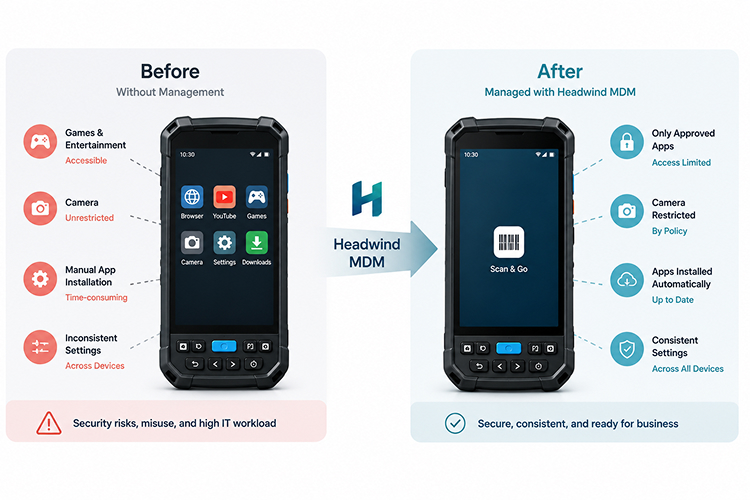
- A launcher that did not hold. The default launcher was supposed to keep employees inside approved applications, but it was easy to bypass. Some staff installed games or opened YouTube during their shifts.
- An open camera. The terminals were bought for barcode scanning, but their built-in cameras stayed available. An employee could photograph internal documents, stock information, price lists, or back-office screens, turning a work device into a data-leak risk.
- Manual setup for every device. Each new scanner was prepared by hand: install apps, adjust settings, configure the scanner, verify it worked. The same routine repeated for every new or replacement device.
This was manageable when the fleet was small. As more stores and terminals came online, device preparation and maintenance started eating a noticeable part of the team’s workweek.
Moving from manual setup to centralized management
The retailer deployed Headwind MDM on its scanner fleet and created one standard configuration for the devices. Instead of treating every scanner as a separate setup project, IT could now apply the same policies, applications, and restrictions to the entire fleet.
Restricting devices to approved applications
The terminals were locked and limited to the applications employees needed for their work. Games, browsers, YouTube, and other unauthorized applications were no longer available. Employees could not leave the working environment or install additional software. This is enforced through Android’s lock task mode, so when a scanner starts, it opens directly into the approved set of applications and remains there throughout the shift.
Disabling the camera
IT disabled camera access through the device policy. This left the barcode scanner available while preventing employees from using the terminal to take ordinary photos. The company no longer had to rely on internal rules or employee awareness to prevent photography inside stores. The restriction was applied centrally and remained active across all managed devices.
Distributing scanner configurations centrally
Previously, scanner settings and configuration profiles were maintained separately on each terminal. With Headwind MDM, IT could prepare the required configuration once and distribute it across the fleet. When a setting needed to be changed, the team updated the central profile instead of visiting or reconfiguring devices one by one.
This also helped keep terminals consistent between stores. Devices were less likely to end up with different application versions, settings, or scanner behavior.
Automating device provisioning
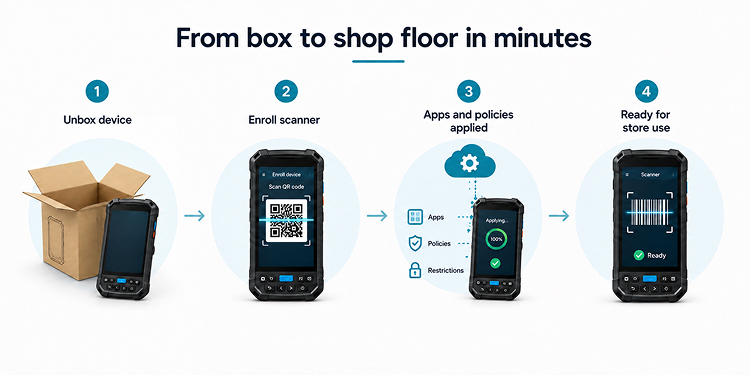
The required business applications were delivered automatically during enrollment. IT staff no longer needed to install each application manually. Once a new scanner was enrolled, it received the same applications, settings, and restrictions as the rest of the fleet. A replacement device could therefore be prepared without rebuilding the entire configuration from scratch.
The results
Scanner onboarding became 60% faster
Before the deployment, preparing a new terminal could take hours of manual work. After enrollment was automated, scanners could be moved from the box to the shop floor in minutes. This was especially useful when opening new stores or replacing damaged devices.
Unauthorized use stopped
Employees could no longer install games, access YouTube, or open unrestricted applications. The camera restriction also removed the possibility of taking unauthorized photos with the scanner terminals. Instead of expecting staff to follow the device policy, the retailer enforced it technically.
Routine IT workload fell by 50%
Centralized application delivery and profile management removed much of the repetitive work involved in maintaining the fleet. The IT team spent less time configuring individual scanners, correcting inconsistent settings, and reinstalling applications. That time could be used for more important infrastructure and support tasks.
Why scanner management matters in retail
Barcode scanners may represent only a small part of a retailer’s overall IT budget, but they are among the most frequently handled devices in a store. They are passed between employees, used across multiple shifts, and often operated by people who have no reason to think about device security or configuration. Without proper management, a scanner can gradually turn into a general-purpose Android device.
That is how games appear, cameras remain active, applications become outdated, and configuration differences build up between stores. The most reliable solution is to remove the unnecessary functions from the device itself.
A scanner that only runs approved work applications cannot turn into an entertainment device, and a disabled camera cannot photograph internal information. Central configuration also keeps devices from drifting apart over time.
Headwind MDM helps retailers keep Android devices focused on the tasks they were purchased for. The same approach can be used for barcode scanners, POS tablets, price checkers, warehouse terminals, and self-service kiosks.
Managing Android devices across multiple retail locations? Learn more about Headwind MDM licensing or contact the team.