A merchandiser’s day is a route. Fifteen, twenty partner stores, one after another. At each stop, the routine is the same: walk the aisles, check what’s on the shelf against what the contract says, photograph it, file the report, drive on.
All of that runs on one Android tablet. When the tablet cooperates, the route finishes on time. When it doesn’t, stops fall off the end of the day.
A food distribution company in Eastern Europe ran into exactly these problems. They solved them with MDM for field merchandisers: Headwind MDM, running on their own server. The company asked us not to publish its name.
How Field Merchandisers Use Android Tablets
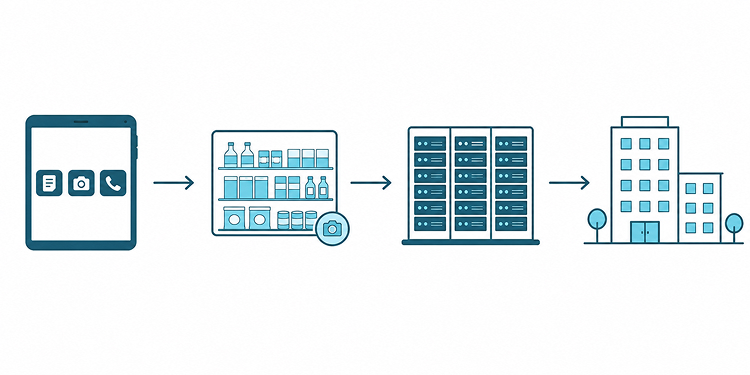
The company supplies food products to partner retail stores across the region. Its merchandisers visit those stores every day, verify stock levels, check product placement, and file reports through a corporate Android app. The shelf photos land at headquarters, where managers check them against the placement agreements. Every merchandiser gets a company tablet. On paper it’s a work device. In practice, nothing made it one.
The Challenge: The Fleet Grew and the Manual Process Broke
A handful of tablets is easy to manage manually. Dozens are not. The more tablets the company added, the harder the fleet became to manage.
Data bills climbed. Between stops, some merchandisers installed games or watched YouTube, and a few did it during the visits too. YouTube alone could burn through a large part of the mobile data allowance. That left less bandwidth for the actual work: reports and shelf photos.
Tablets got slower the longer they stayed in service. Downloaded apps piled up, cached video filled the storage, and files nobody needed sat there for months. When someone quit or moved territories, IT had to wipe the device and rebuild it by hand before handing it to the next person. That took hours.
IT had to check each tablet just to find out which version of the app it was running. Updates depended on whoever was holding the tablet. Some merchandisers installed them. Plenty didn’t. Support ended up debugging over the phone without knowing which build the person on the other end was running.
The Solution: A Locked-Down Fleet on Headwind MDM
The company then installed Headwind MDM across the fleet. For this deployment, four features turned out to matter most.
Kiosk mode, limited to approved apps
Headwind MDM replaced the standard Android launcher with kiosk mode. Merchandisers now see the reporting app, the camera, and a few utilities. No browser, no Play Store, no way to install a game. The company didn’t want another policy nobody would remember. Instead, the tablet itself blocks everything outside the approved workflow.
App updates pushed from the console
IT uploads the APK once, and Headwind MDM handles the rest. A new build can be on every tablet the same afternoon. Before, that could take weeks. Support stopped opening every call with, “Which version are you on?”
Remote access instead of recalls
Merchandisers are on the road all day, so bringing a tablet back to the office for a fix was never realistic. Now support connects to the device, looks at the screen, and fixes the configuration from the console. There is no need to ask a merchandiser to read an error message over the phone.
Enrollment by QR code
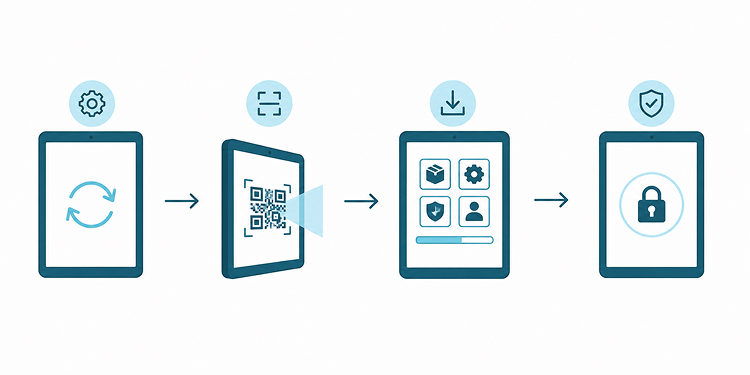
A new tablet gets reset, the QR code is scanned, and that’s it. Headwind MDM installs the apps, applies the settings, locks the launcher. IT no longer has to work through the old setup checklist by hand.
Results: Faster Setup, No More Personal Use
Setting up a tablet got about 60% faster. What used to eat hours now takes minutes. That matters most in seasonal hiring, when several new merchandisers start the same week.
Personal use stopped because there was nothing left to open. No games, no streaming, no side installs. Mobile data went back down to what reports and photos actually need.
IT stopped touching devices one at a time. Configuration happens in the console. Most support gets handled remotely.
“With Headwind MDM, our field teams were able to visit 20% more stores each day,” the company reports.
Beyond Merchandising: Where This Setup Fits
Field merchandising is a boring device-management problem, in the best sense. Dozens or hundreds of near-identical tablets, one small set of apps, the same job every day. Nothing exotic.
Open-source MDM is especially useful for fleets like this. Headwind MDM runs on the company’s own server, so device data stays on infrastructure the company controls. Core management does not depend on Google Mobile Services. This matters when companies use lower-cost Android hardware. That also matters in regions where Google services are limited or unreliable. And because the Community Edition is free, a company can run the server and enroll real devices before paying for anything.
The same approach can work for delivery drivers, service technicians, inventory teams, and other mobile workforces.
How to Replicate This With Headwind MDM
A basic test setup only requires a few steps:
- Install Headwind MDM on your own server, or spin up a cloud instance to test.
- Build a configuration for field devices. Add your apps, set Headwind MDM as the launcher.
- Turn on kiosk mode so the device runs only what you approved. Kiosk mode requires a commercial edition.
- Enroll tablets with the QR code. Provisioning handles the apps and settings.
- Push app updates from the console as new builds come out.
The Community Edition covers app management and provisioning. It’s open source under the Apache License and free to self-host. Kiosk mode and remote screen access come with the commercial editions. See the pricing page for what each tier includes.
How to Start with Headwind MDM
Most companies start with a few tablets and a pilot, not a full rollout. Testing with just a few tablets is usually enough to see whether the setup fits the team. Download the server package and run it on your own hardware, or open a free cloud trial and enroll a test device in a couple of minutes.