A field worker sends a photo to prove the job is done. The container is empty, the site looks clean. One problem: the picture was taken last week, three streets away. This is the gap that MDM photo verification closes – by tying every field photo to a time and a place.
A waste disposal company in Eastern Europe ran into exactly this. Here is how they fixed it with locked-down tablets and geotagged photo reports, and what changed within three months.
Why field photo reports get faked
Field service runs on photo reporting. A driver empties a container, takes a picture in the company app, and moves to the next address. A supervisor sees the picture and closes the task. No calls, no paperwork.
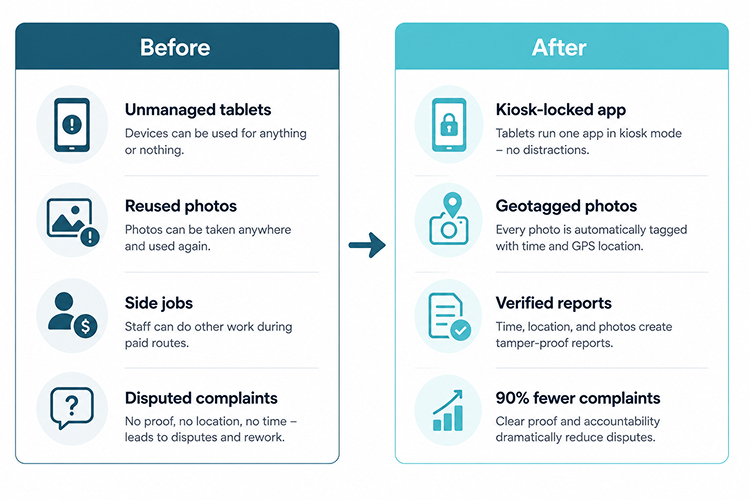
The process works only if the photos can be trusted. A worker facing a penalty for a missed pickup has an incentive to cheat, and cheating is easy. An old photo of the same container passes. A photo of a different container passes too. Without checking when and where a photo was taken, workers could reuse old images instead of returning to the actual location.
Unmanaged tablets add a second problem. Drivers could install personal apps, watch videos, play games, or simply close the business app. In some cases, drivers closed the business app and used company vehicles for unofficial side jobs during work hours, invisible to dispatch.
What was happening in the field
The company equipped its vehicles with Android tablets running a business app for routes and photo reports. The tablets were unmanaged, so nothing stopped a driver from closing the app or installing whatever they wanted. With no reliable way to verify a report, supervisors could not tell whether the complaint was justified or the photo report was genuine.
The fix: kiosk mode plus MDM photo verification
The company installed Headwind MDM on the tablets and locked them down for work use. With kiosk mode enabled, the business app starts automatically when the tablet boots and cannot be closed. The launcher, system settings, and other apps are out of reach.
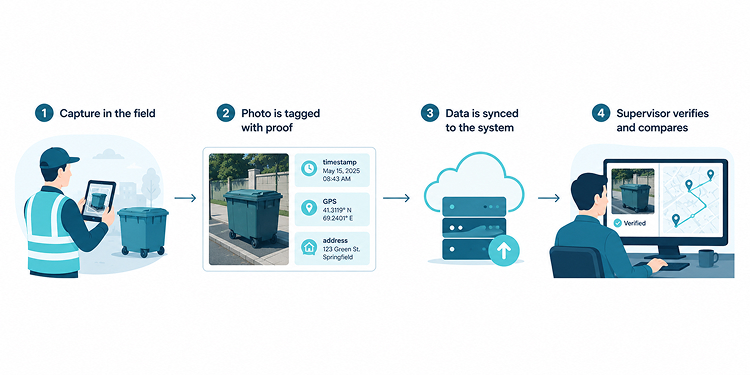
The company also enabled the Photo Transfer module. Every photo uploaded from the field includes a timestamp, GPS coordinates, and a street address. If a driver reused an old photo, the timestamp would show that it was taken earlier. If the photo was taken somewhere else, the GPS coordinates and address would not match the assigned stop.
The IT team also started updating the business app remotely through the MDM console. They no longer had to wait for vehicles to return to the depot just to update the app.
What supervisors see in each report
Each photo report includes the image, capture time, GPS coordinates, street address, and the device it came from. Supervisors compare each report against the route plan. When a complaint comes in, they can check the photo, timestamp, and location against the assigned route.
Results: 90% fewer complaints in three months
The client reported these results on a fleet of 50 tablets:
- Complaints about uncollected waste dropped by 90%.
- Field operations costs fell by about 5%, mainly because the company eliminated unplanned repeat trips.
- Mobile data consumption went down once the tablets stopped running personal apps.
- The project paid for itself in under three months.
These figures were reported by the client. The rollout covered 50 tablets and took several days without taking the vehicles out of service.
Where else geotagged photo reports work
The same approach can work in other field operations where photos are used as proof that a task was completed:
- Delivery teams can attach a location to proof-of-delivery photos.
- Cleaning companies can keep before-and-after records for each site.
- Merchandisers can verify store visits with shelf photos.
- Utility teams can link meter readings to a specific address.
- Security teams can verify patrol checkpoints, while property inspectors can create dated records tied to a specific location.
How to try it on your fleet
Headwind MDM can be self-hosted or used in the cloud. It supports Android devices from different vendors and can manage devices without relying on Google services, which can be useful for low-cost or specialized field hardware. Kiosk mode is built in, and Photo Transfer is available as a plugin. Plans are listed on the pricing page.
Start a cloud trial, enroll a couple of test tablets, and test how geotagged photo reports fit your own field workflow.